Zero-Maintenance Database Backups on AWS Lambda
Managing infrastructure for multiple clients means every project has its own backup situation: a cron job on some server, a half-configured RDS automated backup, or a legacy bare-metal VM that nobody wants to touch.
I wanted one solution that worked regardless of where the database lived, stored everything in a single auditable place, and let me track costs per client without manually slicing through a shared AWS bill. Here’s what I built and what it covers:
The full source is available on GitHub: czemu/aws-db-backup.
- PostgreSQL and MySQL - both in a single run, credentials stored in Secrets Manager as connection URLs
- Streaming to S3 - no disk I/O, memory usage stays flat regardless of database size
- AES256 encryption at rest, public access blocked, write-only IAM policy
- One-script deploy - S3, IAM, ECR, Lambda, EventBridge, all provisioned in one shot
- Per-client cost tags - every resource tagged so you can isolate spend in Cost Explorer
The Dedicated Backup Server Is a Trap
A server that exists solely to run pg_dump once a day is one of the worst value propositions in cloud infrastructure. You’re paying for 24 hours of compute to do about 2 minutes of actual work. But the cost isn’t even the main issue.
The real problem is the security surface. The moment you have a long-running server with database credentials on it, you have something to maintain. It needs OS patches. It needs SSH access management. It needs monitoring. If you’re doing this for multiple clients, you either run one shared backup server (now a blast radius nightmare) or one per client (now you’re managing a fleet of servers whose only job is to sleep and occasionally dump a database).
I didn’t want another server to be responsible for. So I used AWS Lambda instead - and it turned out to be a much cleaner fit than I expected.
Why Lambda Makes Sense Here
Lambda gets a bad reputation for things it genuinely isn’t good at - long-running processes, stateful workloads, anything with complex cold-start sensitivity. But a scheduled database backup is exactly the kind of workload Lambda was designed for:
- It runs infrequently. Once a day at 2 AM. You don’t want to pay for idle time between runs.
- It’s stateless. No session, no in-memory state, no local disk required (more on this in a moment).
- It has a hard time limit. Lambda’s 15-minute maximum timeout is a forcing function. If your backup takes longer than that, you have a problem worth knowing about - not something to silently let run for 6 hours.
- You don’t manage the server. AWS patches it, scales it (not that you need scale here), and you never SSH into anything.
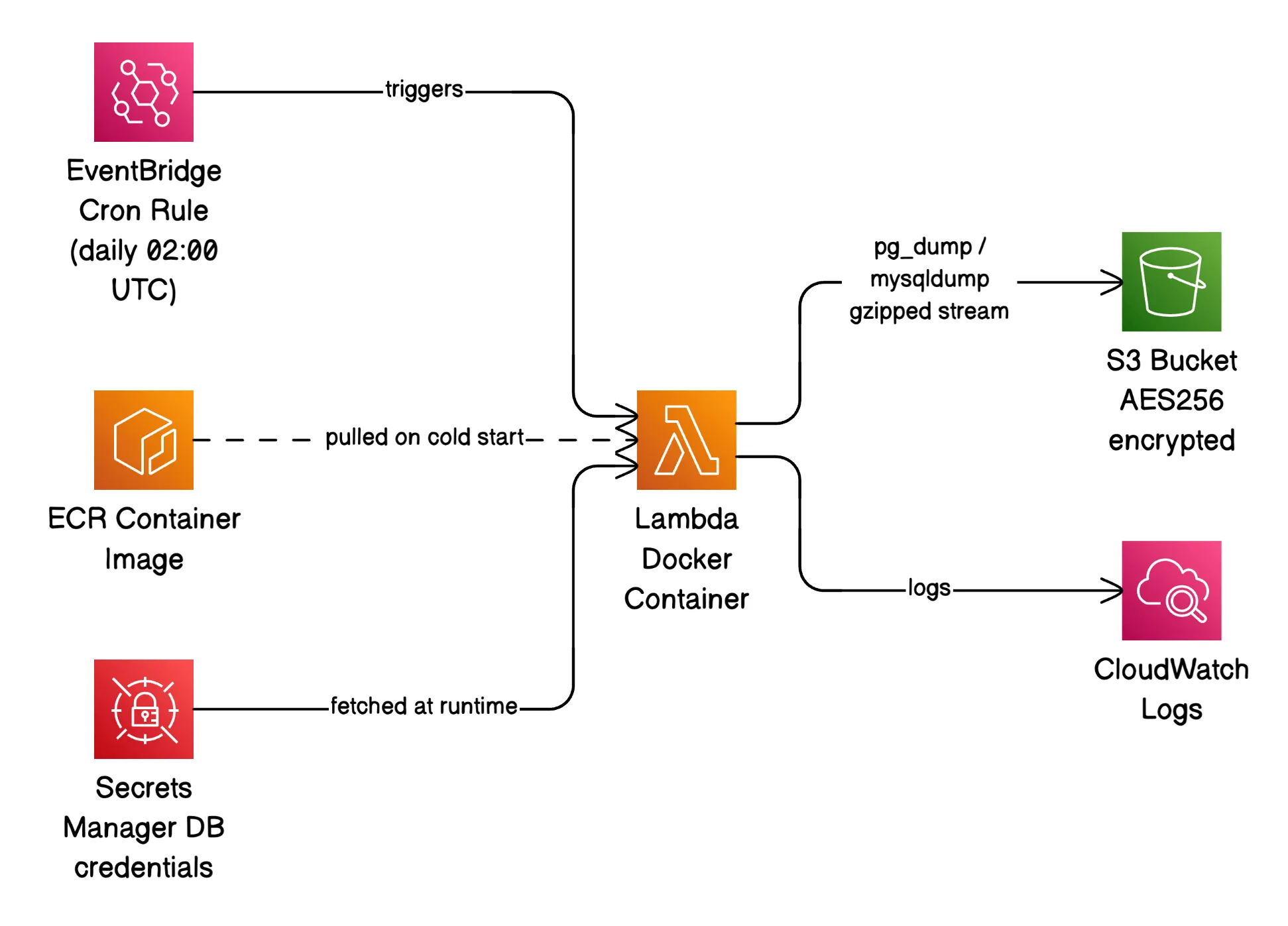
The entire infrastructure footprint is: one Lambda function, one EventBridge rule to trigger it on a cron, one S3 bucket to store the backups, and one Secrets Manager secret holding all the database credentials. That’s it.
How It Actually Works
The Lambda function runs a Docker container image built on Amazon Linux 2023 with a custom shell runtime instead of a managed one (Python, Node.js, etc.) - this keeps the image lean and the dependency surface minimal.
When EventBridge fires the function, backup.sh runs. It pulls a list of databases from Secrets Manager, and for each one it runs either pg_dump or mysqldump, pipes the output through gzip, and streams it directly to S3:
pg_dump --dbname="$url" --format=plain \
  | gzip \
  | aws s3 cp - "s3://$S3_BUCKET/$db_name/${db_name}_$(date +%F_%H-%M-%S).sql.gz" \
    --sse AES256
That pipeline is the core of the whole thing, and it has a property worth calling out: nothing touches disk. The dump streams from the database directly into the S3 upload. Lambda supports up to 10 GB of ephemeral /tmp storage, but you’d need to configure it, pay for it, and clean up after every run. Streaming sidesteps all of that and keeps memory usage flat regardless of database size.
The secret in Secrets Manager is a simple JSON object:
{
  "databases": [
    {
      "name": "app-1",
      "url": "postgresql://user:pass@host:5432/dbname",
      "type": "postgresql"
    },
    {
      "name": "app-2",
      "url": "mysql://user:p%40ss@host:3306/dbname",
      "type": "mysql"
    }
  ]
}
Add a new database to that JSON and it gets backed up on the next run. No redeployment needed.
The Docker Build: Getting MySQL Into Amazon Linux 2023
This was the most annoying part of the build. PostgreSQL 17 is available in Amazon Linux 2023’s default package repos. MySQL’s client tools are not. MySQL publishes official RPMs for RHEL/CentOS/AlmaLinux but not for AL2023 directly.
The solution was a multi-stage Docker build. Stage one uses AlmaLinux 9 (EL9-compatible) to install mysqldump and its shared library from MySQL’s official RPM repo. Stage two is the actual Lambda image, and it copies only the binary and the .so file across:
FROM almalinux:9 AS mysql-builder
RUN dnf install -y https://dev.mysql.com/get/mysql84-community-release-el9-3.noarch.rpm \
 && dnf install -y mysql-community-client mysql-community-libs \
 && dnf clean all

FROM public.ecr.aws/lambda/provided:al2023
COPY --from=mysql-builder /usr/bin/mysqldump /usr/bin/mysqldump
COPY --from=mysql-builder /usr/lib64/libmysqlclient.so* /usr/lib64/
The final image only contains what it needs. No full MySQL installation, no package manager cruft from the builder stage.
Handling MySQL’s Connection String Problem
pg_dump accepts a full PostgreSQL connection URL via --dbname. mysqldump does not. It wants host, port, user, and password as separate flags.
Since all credentials are stored as URLs in Secrets Manager (one consistent format for all database types), the backup script has to parse the MySQL URL manually and split it into components. That’s mostly straightforward - except for one edge case: passwords with special characters.
If a MySQL password contains @, it needs to be percent-encoded as %40 in the URL. The @ character is what separates the credentials from the hostname in a connection string, so an unencoded @ in the password breaks parsing completely. After splitting the URL, the script decodes the password with:
password=$(python3 -c "import urllib.parse, sys; print(urllib.parse.unquote(sys.argv[1]))" "$raw_password")And the decoded password is passed via the MYSQL_PWD environment variable rather than a CLI flag - because anything you put in a CLI flag shows up in ps output and process logs.
IAM: Write-Only by Design
The Lambda execution role has exactly three capabilities:
{
  "Statement": [
    {
      "Sid": "CloudWatchLogs",
      "Effect": "Allow",
      "Action": ["logs:CreateLogGroup", "logs:CreateLogStream", "logs:PutLogEvents"],
      "Resource": "arn:aws:logs:*:*:log-group:/aws/lambda/YOUR_FUNCTION_NAME*"
    },
    {
      "Sid": "S3WriteBackups",
      "Effect": "Allow",
      "Action": ["s3:PutObject"],
      "Resource": "arn:aws:s3:::YOUR_BUCKET_NAME/*"
    },
    {
      "Sid": "SecretsManagerRead",
      "Effect": "Allow",
      "Action": ["secretsmanager:GetSecretValue"],
      "Resource": "arn:aws:secretsmanager:*:*:secret:YOUR_SECRET_NAME-*"
    }
  ]
}
No GetObject. No DeleteObject. No ListBucket. The Lambda function cannot read back or delete existing backups, even if the code running inside it were compromised. This is a small thing that costs nothing to implement and meaningfully limits the blast radius of a bad deployment or a supply chain issue in one of the base images.
One gotcha worth knowing: Secrets Manager appends a random 6-character suffix to every secret ARN (e.g., my-secret-aBcDeF). Your policy resource needs a trailing wildcard - secret:my-secret-* - otherwise access will be denied and it’ll look like the secret doesn’t exist.
Cost Tracking Per Client
Each AWS resource in this stack is tagged with three tags: Project, Client, and Environment. When you’re running this for multiple clients, you deploy the stack once per client with a different TAG_CLIENT value.
In AWS Cost Explorer, you can then group by the Client tag and see exactly what each client’s backup solution costs you - compute, storage, API calls, everything. The compute cost for running a Lambda function a few minutes per day is negligible. Storage is the only variable worth watching, and it scales with how much data you’re actually backing up.
That’s not the impressive part. The impressive part is being able to hand a client a line-item breakdown without having to explain that their costs are buried inside a shared server you’re splitting mentally across projects.
Storage Lifecycle: Pay for What You Actually Need
S3 gives you several storage tiers, and for backup data the access pattern is predictable: recent backups get retrieved occasionally (if at all), old ones almost never. There’s no reason to pay Standard storage rates for a 3-month-old SQL dump.
The lifecycle policy handles this automatically:
{
  "Rules": [{
    "Status": "Enabled",
    "Filter": { "Prefix": "" },
    "Transitions": [
      { "Days": 30,  "StorageClass": "STANDARD_IA" },
      { "Days": 90,  "StorageClass": "GLACIER" }
    ],
    "Expiration": { "Days": 180 }
  }]
}
Here’s the reasoning behind each threshold:
Day 0–30 → Standard. If you need a backup urgently, it’s probably a recent one. Keep it fast and immediately accessible.
Day 30–90 → Standard-IA. After a month, the chance of needing a specific backup drops significantly. Standard-IA costs roughly 40% less than Standard. There’s a small retrieval fee, but for a disaster recovery scenario you’re not going to care about a few cents.
Day 90–180 → Glacier. This is archival territory. Retrieval takes minutes to hours, but storage costs fractions of a cent per GB per month. If you’re pulling a 3-month-old backup, something has gone seriously wrong and the retrieval wait is the least of your concerns.
After 180 days → delete. Six months of daily backups is a lot of coverage. For most workloads, the marginal value of keeping a 7th month approaches zero. Adjust this to match your client’s actual retention requirements - compliance-heavy industries (finance, healthcare) may need significantly longer.
Deployment Is One Script
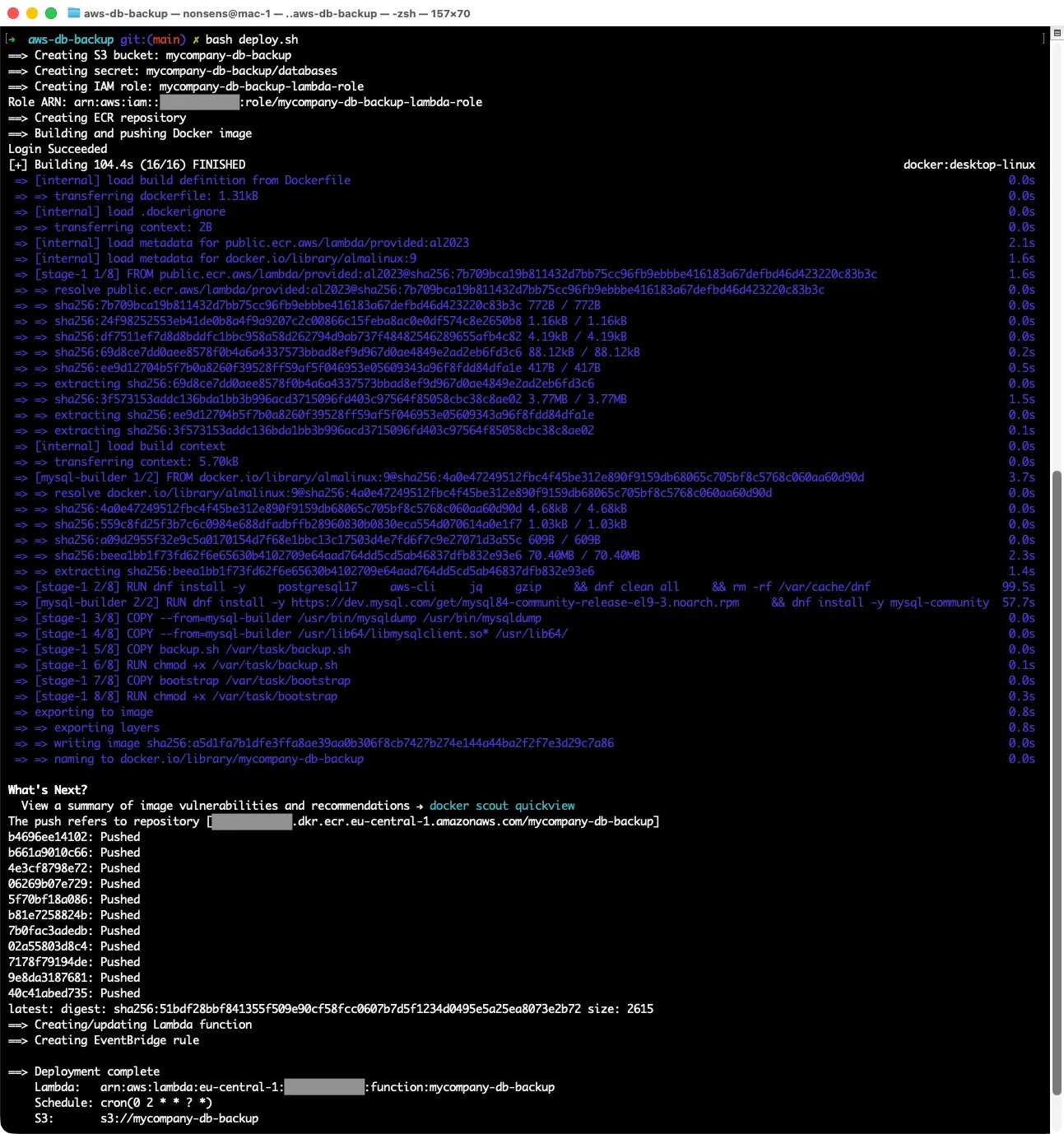
The entire infrastructure is provisioned by a single deploy.sh - S3 bucket, Secrets Manager secret, IAM role and policy, ECR repository, Docker build and push, Lambda function creation, EventBridge rule. Run it once, it’s done.
The script is idempotent. If you run it again after a partial failure, or after updating the Docker image, it handles the “already exists” cases gracefully. The Secrets Manager step even handles the case where a previous teardown left the secret in a 30-day pending-deletion window - it calls restore-secret first before trying to create.
There’s a matching teardown.sh that removes everything in the correct dependency order and empties the S3 bucket before deleting it (with a flag to preserve the bucket and its backups if you only want to tear down the compute side).
What This Doesn’t Do
A few things worth being honest about:
No VPC support out of the box. The Lambda runs outside any VPC and connects to databases over public endpoints. If your databases are in a private subnet with no public access, you’d need to put the Lambda inside that VPC with appropriate security group rules. That’s a straightforward change but adds complexity to the setup.
No restore automation. This solution backs up. Restoring is manual - download the .sql.gz from S3, decompress, run psql or mysql. For most use cases that’s fine. A full restore automation layer would be a separate project.
No backup verification. The backup is considered successful if the pipeline exits 0 and the S3 upload completes. It doesn’t verify that the SQL file is actually valid and restorable. For truly critical data, you’d want a periodic restore test in a staging environment.
Final Thoughts
The thing I like most about this solution is that it’s boring in all the right ways. There’s no infrastructure to babysit, no servers to patch, no SSH keys to rotate. EventBridge fires at 2 AM, Lambda runs for a few minutes, backups land in S3, Lambda goes back to sleep. CloudWatch has the logs if something goes wrong.
If you’re managing databases for multiple clients and you’re still running a dedicated backup server somewhere - or worse, relying on database-level automated backups as your only copy - this kind of setup is worth the afternoon it takes to configure. You get offsite backups (S3 is not your database’s cloud), encryption at rest, per-client cost visibility, and one less server to worry about.
The whole thing is about 300 lines of shell script, a Dockerfile, and a handful of AWS CLI calls. Sometimes the right solution really is that simple.
© 2026 paweldymek.com