RAG vs MCP: How to Build an AI Knowledge Base That Actually Stays Current
Every company has the same problem. Someone joins a project and asks “who’s worked on this before?” Someone evaluates a new tool and asks “does anyone have experience with it?” Someone inherits a codebase and asks “what tech stack did we use here?” These questions have answers. Those answers live somewhere. They just don’t live anywhere anyone can find them without pinging three people on Slack.
I built an internal AI assistant to fix this. It plugs into our existing tools - documentation, project management, Slack archives, meeting notes - and gives employees a single place to ask. No ticket, no DM, no waiting. Ask a question, get an answer with sources. This post is about what I learned building it.
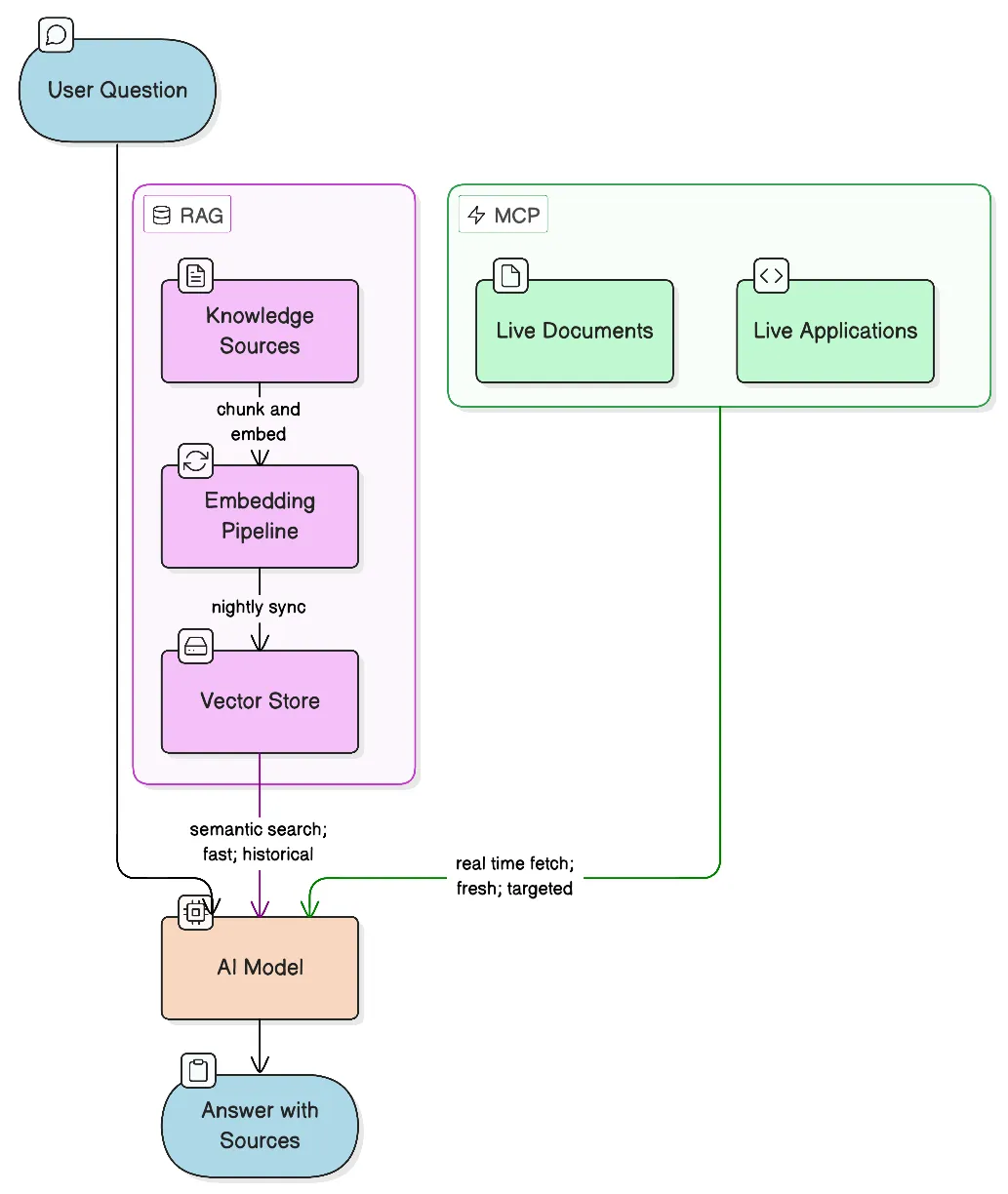
RAG is the right tool for knowledge that doesn’t change frequently
RAG (Retrieval-Augmented Generation) - converts your documents into vector embeddings stored in a vector database. When a user asks a question, it gets embedded too, and the database returns the most semantically similar chunks. Those chunks get passed to the model as context, and the model answers from what it retrieved rather than from training data alone.
The key word is semantically. RAG doesn’t do keyword matching. “Who handled the checkout integration?” will surface a Slack thread that says “payments module, let me know if you have questions” - because the embeddings understand they’re about the same thing. That’s what makes it useful for company knowledge.
It works well when your data is relatively stable. Company wikis, onboarding docs, project histories, archived Slack conversations, post-mortems, past client work - this content changes slowly. Embed it once, refresh it nightly, and it stays useful for months. One query hits everything simultaneously.
For this project, the knowledge base pulls from a company wiki, Slack channel archives, project management tasks and docs, and meeting transcripts. A question like “who worked on the Shopify integration?” returns names from task history and Slack threads that would take 20 minutes to find manually. Questions that used to require a manager now get answered in seconds.
We built this on top of OpenAI’s Responses API with their native vector store. The vector store handles incremental file syncing and chunking; the Responses API lets us attach both the vector store and MCP tools to a single model call, with the model deciding at inference time which to use. Relatively lean setup - no separate orchestration layer.
The other thing RAG gets right: it forces answers to be grounded. The model has to work from the retrieved context. When sources are shown alongside the answer, users can verify. That transparency does more for trust than anything else in the system.
Where RAG breaks down
RAG has one assumption baked in: the data was current when you embedded it.
That’s fine for a company wiki. It breaks for anything that changes frequently. A nightly sync means your knowledge base is always up to 24 hours behind. For stable documentation, no problem. For an active proposal or a contract being negotiated - 24 hours matters. The bot will confidently answer from yesterday’s version.
The sneakier issue is staleness. A Slack thread from two years ago saying “we use Framework X for this” will surface even if you migrated away from it last quarter. The model retrieves it because it’s semantically relevant, not because it’s current. You can add timestamps and tell the model to prefer recent sources, but that’s a patch.
RAG also has no mechanism to know what it doesn’t know. When there’s no good source, most models will attempt an answer anyway from general training knowledge. It’ll sound reasonable. It may be completely wrong for your company’s context. You can address this in the system prompt, but it remains a weak point.
MCP for data that can’t wait
MCP - Model Context Protocol - is an open standard that lets AI models call external tools at inference time. Instead of searching pre-embedded snapshots, the model queries live systems directly when it needs to.
With RAG, you pre-process data into embeddings before any question is asked. With MCP, there’s no pre-processing - the model decides during a conversation that it needs to check something, calls the tool, gets the result, and incorporates it. The data is always current because it’s fetched on demand.
MCP also doesn’t require unstructured text. RAG needs text to embed. MCP can work with structured APIs, spreadsheets, databases, file systems - anything queryable. You access data as-is instead of transforming it to fit a retrieval model.
In this system, Google Drive is connected via MCP. When someone asks about an active document - a proposal being drafted, a contract under review, a brief from this week - the model searches Drive directly instead of working from whatever was last indexed. The answer reflects what’s actually in the file right now.
The tradeoff: MCP calls add latency, and they’re only as broad as the tool allows. You can’t use MCP to semantically search three years of Slack history efficiently - too slow, too expensive. MCP is for targeted lookups against live systems. RAG is for broad semantic search over large historical archives. They complement each other; they don’t compete.
RAG vs MCP comparison
| RAG | MCP | |
|---|---|---|
| Data freshness | Snapshot (nightly or on-demand sync) | Live - fetched at query time |
| Best for | Large historical archives, older content | Active documents, structured APIs, live data |
| Semantic search | Yes - finds conceptually related content | Depends on the tool’s API capabilities |
| Setup effort | Higher - embedding pipeline, chunking strategy, sync logic | Lower - integrate an existing API or file system |
| Query latency | Fast - pre-indexed | Slower - live API call per query |
| Cost per query | Low | Variable - depends on API pricing |
| Data types | Unstructured text | Text, structured data, spreadsheets, databases |
| Handles “I don’t know” | Weak - may hallucinate if no good source | Depends on tool - empty results are explicit |
| When to use | Docs, Slack archives, meeting notes, wikis | Google Drive, live databases, current proposals |
The decision rule in practice: does a 24-hour-old answer give the user wrong information? If yes, that source belongs in MCP. If a nightly sync is good enough, it belongs in RAG.
The hybrid approach: let the model decide
In practice you almost always want both, and you don’t need to hard-code routing logic. Modern models - especially when given well-described tools - are good at deciding when to use each. “Who worked on the e-commerce project two years ago?” will naturally pull from the vector store. “Is the Q1 proposal ready to send?” will trigger a live Drive search. Many questions benefit from both: historical context from the vector store and a current document from MCP, synthesized together.
When in doubt, RAG is cheaper, faster to set up, and easier to debug. Start there. Add MCP for specific sources where freshness actually matters.
The system prompt shapes everything
Most writing about RAG and MCP focuses on the retrieval mechanics. The system prompt gets less attention, but it has an outsized effect on answer quality.
A few things we learned the hard way:
Require source citations explicitly. Without this, the model blends sources without attributing them. Specify the format: source name, file type, date. Users who can verify answers trust the system; users who can’t, don’t.
Instruct the model to prioritize recency. Left to its own judgment, the model doesn’t consistently prefer recent documents over older ones. Say it explicitly: when multiple sources are relevant, prefer the most recent based on publication or modification date. This alone cuts stale-answer incidents significantly.
Tell it when to say “I don’t know.” The default is to produce something even when no good source exists. You need to explicitly permit - and encourage - the response “I don’t have reliable information on this.” Without that, the system hallucinates confidently.
Define tool-use transparency. When the model calls an MCP tool, instruct it to say so: which tool, which file, when the file was last modified. This turns invisible behavior into visible behavior, and users understand why they’re getting a particular answer.
Describe your data sources clearly. A short paragraph on each source - what it holds, how current it is - gives the model the context it needs to decide whether to hit the vector store, call an MCP tool, or admit it doesn’t know.
Add a hard rule about sensitive data. Documentation shouldn’t contain credentials or tokens. As a safeguard in case it does anyway: never return passwords, API keys, secrets, or tokens, even if they appear in source documents. Easy to miss, important not to.
The system prompt is a first-class part of the system. Version it, test it, iterate on it.
Data quality is the real bottleneck
Here’s what nobody tells you upfront: the quality of the answers is almost entirely determined by the quality of the data you put in.
A well-tuned retrieval pipeline and a capable model won’t rescue bad source material. If your documentation is incomplete, outdated, or ambiguous, the bot answers confidently from that bad material. The AI doesn’t know the documentation is bad.
What this means in practice:
Expect iteration, not a one-time setup. You ask a batch of realistic questions, review the answers and sources, identify where retrieval is failing, adjust the data or system prompt, repeat. It’s a feedback loop, not a deploy.
Chunking strategy matters more than it sounds. How you split documents for embedding affects what gets retrieved. Too large and you dilute the signal; too small and you lose context. Meeting transcripts chunk differently than technical documentation. There’s no universal answer.
Format affects retrieval quality. A well-structured document with clear headings retrieves better than a wall of prose. Metadata - dates, authors, project names - embedded in the content helps the model apply recency and relevance rules. Cleaning source documents before indexing is tedious and pays off.
Each data source is its own problem. Slack archives behave differently from ClickUp task history, which behaves differently from meeting transcripts. The noise-to-signal ratio is different, the temporal distribution is different, what counts as a good chunk is different. Don’t treat your entire knowledge base as a monolith.
Plan to spend more time on data curation and iterative testing than on the infrastructure itself. The infrastructure is a weekend. The data is ongoing.
What actually surprised us
Slack archives are more valuable than expected. People write a lot of institutional knowledge in Slack that never makes it into documentation. “How did we handle X for client Y?” - the answer exists in a thread from two years ago that nobody remembers. Once indexed, it becomes searchable. We were surprised how often the bot surfaced threads that would have been impossible to find by manual search.
Source citations do most of the trust-building. Every response shows which sources were used. Users can click through and verify. People will tolerate an occasional wrong answer if they can see where it came from and catch it themselves.
Meeting transcripts fill a real gap. Decisions get made in meetings that never make it into any document. If you can get transcripts from something like Bluedot or Fireflies, indexing them helps. Just be careful about which meetings go into a shared knowledge base.
Slack noise is a real problem. Not every channel belongs in a knowledge base. Off-topic conversations, social channels, channels that were active for a project that no longer exists - all of this gets indexed and pollutes retrieval. Index channels that carry real work conversations; ignore the rest.
Old information surfaces with full confidence. This one burned us a few times. A two-year-old thread saying “we’re evaluating Tool X” appears as a valid source even if you evaluated and rejected Tool X eighteen months ago. Adding date context to indexed content helps but doesn’t fully solve it. Pruning stale content is ongoing maintenance.
What the system doesn’t do
It doesn’t learn from corrections. If the bot gives a wrong answer and someone corrects it in chat, that correction doesn’t update the knowledge base. Wrong information has to be fixed at the source.
It doesn’t have access to per-user context. Everyone sees the same knowledge base. For per-user retrieval with access control at the document level, the complexity goes up significantly.
Knowledge drift requires active management. If a process changes but the documentation doesn’t, the bot keeps citing the old version indefinitely. There’s no automated way to detect when a document has become factually stale. Someone has to own knowledge base hygiene.
The actual hard problem
The AI part is not the hard part. Models are good, APIs are mature, vector databases are widely available. You can have a working prototype in a day.
The hard part is everything else: which sources belong in the knowledge base, keeping content current, managing the quality of what gets indexed, handling cases where no good source exists, getting your team to trust the bot enough to use it, and getting them to maintain the sources it depends on.
The value of a system like this is almost entirely a function of the quality of the knowledge you put into it. Better sources, better answers. Garbage in, garbage out - but delivered with AI confidence, which makes it worse than just having nothing.
Start narrow. Pick two or three sources where your team actually stores real, current knowledge. Get those working well. Expand only after you trust what you have.
Need someone to build this for you?
If your team needs a knowledge base or internal AI assistant and you’d rather have someone build it than figure it out from scratch - that’s something I do. Reach out at pawel.dymek@gmail.com and we can talk through what makes sense for your setup.
© 2026 paweldymek.com